MeiMei for pets

A spare phone, tablet or laptop stays at home and watches your pet. Your own phone shows what it sees and tells you when barking, howling, whining or meowing goes on.

Open MeiMei for pets

Open it on the spare device that stays at home, not on your own phone.

Already set up the device at home? On your own device, choose Watch on this device, then scan the code shown on it.
Watch on this device

What it looks like

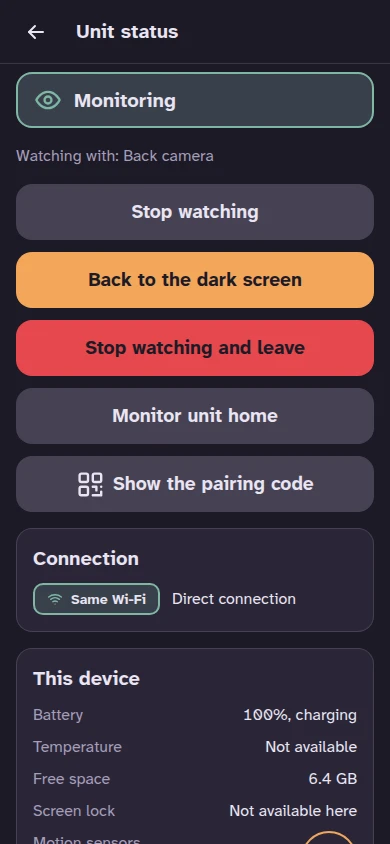
The pet monitor's screen when it is woken: Monitoring, what it watches with, the connection and the device's state.
The unit at home
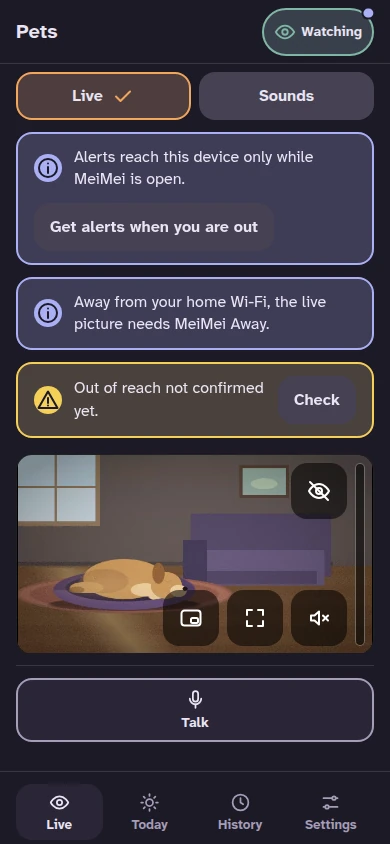
Live on the viewer's phone: a dog resting on its bed in a living room, with the day's summary under the picture.
Live on your phone

What it does

The spare device listens, looks and sends you what matters.

  • A live picture and sound, at any time you choose to look.
  • Talk to your pet, or play a calming sound, from your phone.
  • Tells you when barking, howling, whining or meowing goes on for a minute. You can change the time.
  • Listens for a smoke alarm and for something breaking.
  • Tells you if the device is moved, covered or low on battery.
  • A summary of the day: how many times, and for how long.

How to start

It takes a minute.

  • On the spare device, open MeiMei and tap Start with the recommended settings.
  • Scan the code on its screen with your phone.
  • Tap Start watching when you leave, and Stop when you are back. Or leave it running.

What it cannot do

Please read this before you rely on it.

  • It watches one room, with a phone microphone and camera.
  • An alert can be wrong, late, or not arrive at all.
  • A pet that is out of the picture is not seen.
  • A neighbour's dog, a television or a doorbell can start an alert.
  • MeiMei does not know why a pet makes a sound.
  • Alerts reach your phone while MeiMei is open. To get them when you are out, sign in with a free account or use the app.

Keep the device safe

Put the device and its charging cable where your pet cannot reach, chew or knock them down. A device that charges all day gets warm: keep it out of the sun, off beds, sofas and blankets, with air around it.

Who it can see and hear

While it watches, the pet unit's screen is dark. It sees and hears everyone in the room, not only your pet: a visitor, a sitter, a neighbour through a wall. With a plan that includes clips, it can save short clips that hold their voices and picture. Tell the people who come into your home that the device can see, hear and save clips.

What is free, and what needs a plan

Alerts are always free. A plan adds the rest.

Free

  • Alerts to your phone, with or without an account.
  • The live picture and sound at home, and talking to your pet.
  • The built-in calming sounds.
  • One monitor unit for the home.
  • Nothing is saved: the day summary is shown while the session runs.

MeiMei Home

  • Short video clips around an alert, and sound clips, kept on your own device.
  • Past days in the summary.
  • Your own recorded voice as a sound for your pet.
  • Up to 2 monitor units.

MeiMei Away

  • Everything in MeiMei Home.
  • The live picture away from your home Wi-Fi. Alerts arrive without it.

See the plans and their prices

How MeiMei handles your data

Guides

Spare phone as a camera

Setup, the controls on your phone, what it tells you, the signs everyone there can see, and the limits.

Browser permissions

The camera, microphone and alerts each need one browser permission: where to find them on every device.

All guides