A child’s room
A spare phone or tablet stays in the room. Your own phone shows the picture and tells you when the child cries or moves.
Free, private monitor app for any phone, tablet or computer
Set up the device that stays at home:
A child’s roomAn older personA petA camera
Then, on your own phone:
On your own device, open this and scan the code shown on the device that stays at home.

Pick one. The app then offers the recommended settings, or you can set it up yourself.
A spare phone or tablet stays in the room. Your own phone shows the picture and tells you when the child cries or moves.
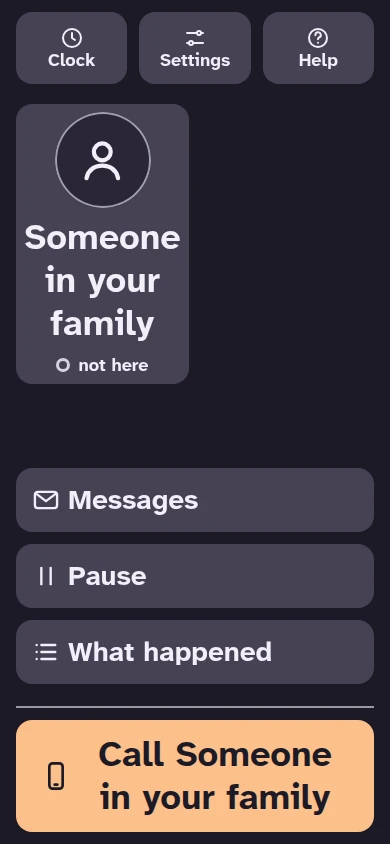
A screen that stays with them: one large Call button, and short text alerts to the family. The person is asked what it may listen for, and can say no or pause at any time.
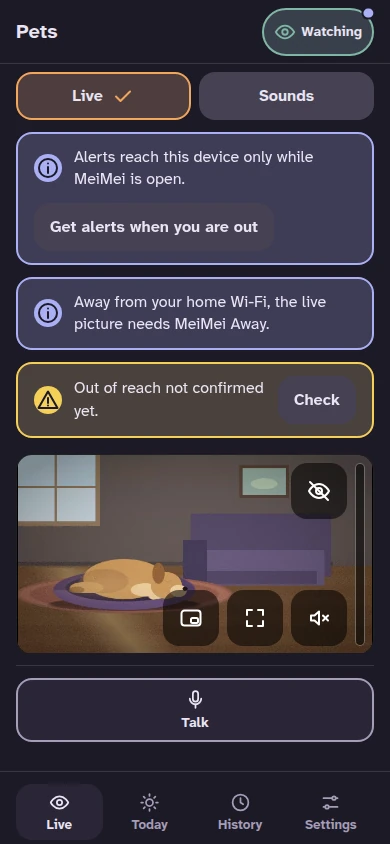
A spare phone or tablet watches your dog or cat. Your phone shows the picture and tells you when barking or meowing goes on.
A spare phone or tablet becomes a camera you watch and control from your phone: a room, a door, a workshop or a holiday home.
Already have the device at home set up? Watch on this device
All four use devices you already own, with the same account and plans. You choose one when you set up the device that stays at home.
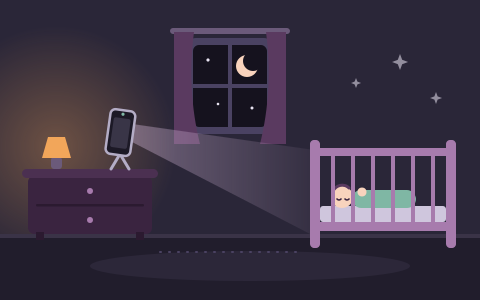
For someone who sleeps or rests there: a baby, a child, or anyone who needs an eye kept on them.
Free to watch, listen and get alerts. MeiMei Home keeps your nights; MeiMei Away adds looking in from outside the house.
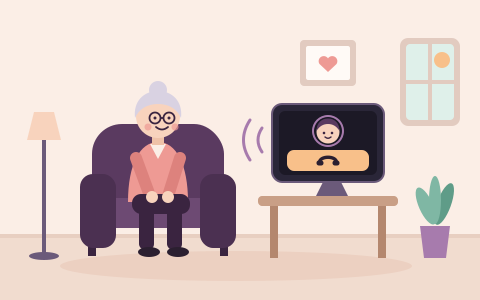
For someone at home who wants an easy way to call you, often an older relative.
For someone who wants to know when their dog or cat barks, howls, whines or meows for a while.
Alerts are always free. MeiMei Home keeps short clips on your own device; MeiMei Away adds the live picture away from your home Wi-Fi.
For a room, a door, a workshop, a garage or a holiday home that you want to watch and control from your phone.
Live view on the same network, talk and every alert are free, with one camera. Watching from anywhere needs MeiMei Away; clips need MeiMei Home or MeiMei Away.
| Watch over a room | A screen to call the family | Watch over a pet | Use a spare device as a camera | |
|---|---|---|---|---|
| Who it is for | A baby, a child, or anyone who sleeps or rests in the room | Someone at home who wants an easy way to call you, often an older relative | Someone who wants to know when their dog or cat barks, howls, whines or meows for a while | Someone who wants to watch and control a room, a door, a workshop, a garage or a holiday home from their phone |
| The device at home | Watches and listens from across the room. Nobody has to touch it. | Shows one large Call button and speaks to the person in their language. | A spare phone, tablet or laptop that watches and listens to the room. While it watches, its screen is dark. | A spare phone, tablet or laptop with its screen lit. The screen says that the camera is on and shows when someone is watching, listening or talking. |
| What the family gets | Live picture and sound whenever you look in, and alerts | Calls from the person, and short text alerts | Live picture and sound whenever you look in, talking to your pet, and alerts | Live picture and sound, a choice of cameras, zoom, pictures, talking through its speaker, and alerts |
| Alerts | Crying, movement and loud sounds. With MeiMei Home, a short clip comes with them. | Text only. A smoke alarm at once; a call for help if “Are you all right?” gets no answer. | Barking, howling, whining or meowing that goes on for a minute, a smoke alarm, something breaking, the device moved, covered or low on battery. An alert can be wrong, late or not arrive. | Loud sounds, a sound like glass breaking, a smoke alarm, movement, the camera moved or covered, and its own battery and connection. You choose which alerts tell you. Alerts can be wrong or late. |
| Where picture and sound go | Only between your own paired devices, while you look in. Away from home, through our relay, still encrypted from phone to phone. Never stored. | Nowhere, except in a two-way call that the person answers or has agreed to beforehand, encrypted between the two devices. Alerts are words only. | Only between your own paired devices, while you look in. Sound is analysed on the unit itself: nothing it hears is sent anywhere to be analysed. | Picture and sound go only between the camera and your phone, while you ask for them. Our servers never see them and do not store them. |
| What is kept, and where | With MeiMei Home or Away, clips and nights stay on your devices for up to 30 nights. Without a plan, nothing is saved. | No recordings. What the screen noticed and every yes and no stay on the screen. Family devices keep only what they were told. | With a plan that includes clips, short clips stay on your own device. Without a plan, nothing is saved. | With a plan that includes clips, a short clip with picture and sound is saved on the camera device when there is an alert. Without a plan, nothing is saved. |
| How consent works | The family who sets it up decides, and the monitor unit's screen says “Watching” while it watches. An adult who sleeps or rests in the room should know and agree. | The person decides. Every permission is asked aloud and on the screen, in their language. Set up step by step, nothing is switched on without their yes. With the recommended settings the screen listens from the hand-over, says so aloud and asks within a day. They can pause at any time, and others can only ask. | The unit’s screen is dark while it watches. It sees and hears everyone in the room, not only your pet, so tell the people who come into your home that it can see, hear and, with a plan that includes clips, save clips. | Everyone there can tell: the screen stays lit and says that the camera is on, it shows when someone is watching, and it plays a chime. Anyone there can stop it with one button. Tell the people who live or work there. |

Live picture and sound go only between your own paired devices, while you look in: straight across your home Wi-Fi, or through our relay, still encrypted from phone to phone, when you are away. Our servers store no video, pictures or sound, and alerts pass through them encrypted. With MeiMei Home or Away, clips and nights stay on your devices for up to 30 nights. The family who sets it up decides; if an adult sleeps or rests in the room, they should know about it and agree.
The person decides: the screen asks for every permission aloud and in writing, in their language. Set up step by step, nothing listens and nothing is sent without their yes. With the recommended settings the screen listens from the hand-over, says so aloud and shows it, asks the person within a day, and, three days after the hand-over, switches off the listening that was not confirmed and tells the family; what they said yes to stays on. They can pause it or say no at any time, as easily as they agreed, and a helper or a family member can only ask. Sound is analysed on the screen and thrown away: only words leave it, and picture and sound are shared only in a call that the person answers or has agreed to beforehand. What the screen noticed, and the record of every yes and no, stay on the screen.
While it watches, the pet unit’s screen is dark. It sees and hears everyone in the room, not only your pet: a visitor, a sitter, a neighbour through a wall. Sound is analysed on the unit, and nothing it hears is sent anywhere to be analysed. With a plan that includes clips, short clips that hold their voices and picture stay on the unit. Tell the people who come into your home that the device can see, hear and save clips.
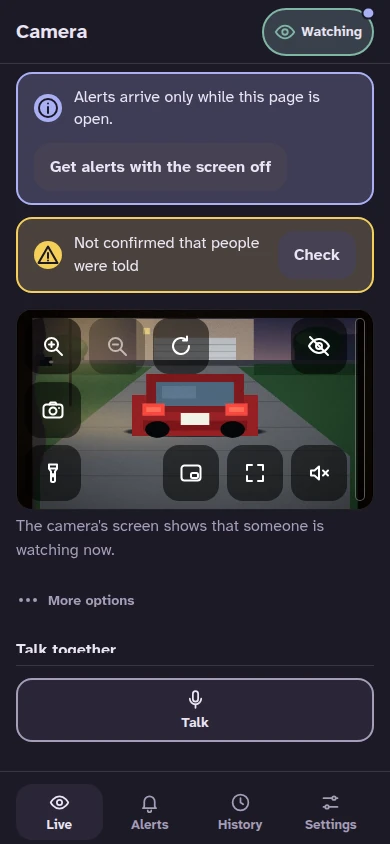
Everyone there can tell: the camera’s screen stays lit and says that the camera is on, it shows when someone is watching, listening or talking, and it plays a short chime. Anyone there can stop it. Live picture and sound go between the camera and your phone only while you ask for them; our servers never see them and do not store them. A clip stays on the camera device, encrypted, and only with a plan that includes clips. Tell the people who live or work there.
This screen is not an emergency alarm. It can miss things, and a message can arrive late or not at all. In an emergency, call your emergency number.
On-device AI tells crying from coughing and chatter, notices movement in the bed and warns you if someone moves the monitor unit. A few meaningful alerts instead of a constant stream of noise.
At home, the two phones talk directly to each other. Live video starts only when you ask for it, and clips and history stay on your phones. No analytics, no ads, no trackers.
An older phone, a tablet or a laptop becomes the monitor unit; your phone or computer is the viewer device. Nothing to buy, nothing to mount on the bed, and it comes with you when you travel.
These are real screens from the MeiMei app, not drawings, shown in your language. The badge says what each feature needs.
Watch and listen at the same time, or only one of them. With several monitor units, the pictures sit side by side, and full screen keeps a second picture in a small box you can move. The screen names the camera the monitor unit is using, and with MeiMei Away the view carries on over the internet when you leave your Wi-Fi.


50 calm songs, including classic melodies, white noise and playlists you make yourself play on the monitor unit, and you choose them from your own phone. Tap “Listen to what’s playing” to hear on your phone what the monitor unit is playing. With MeiMei Home or Away you can add your own songs and voice recordings too.
With MeiMei Home or Away, alerts for things you can see come with a short video from the monitor unit: movement, a phone that was moved, or crying that lasts longer than a minute. Nothing plays by itself; you tap to watch. Clips stay on the monitor unit for up to 30 nights.

Sound alerts, such as coughing or a loud noise, come with a 5-second sound clip: 2.5 seconds before the alert and 2.5 seconds after. Tap to listen, from the alert or from Tonight. Sound clips are part of MeiMei Home and Away, and are kept on the monitor unit like video clips.

The Tonight tab shows the night as one line you can tap. Close MeiMei and open it again: it reconnects by itself, and “While you were away” lists what happened meanwhile, the most urgent first. Keeping nights for later, with a timeline and a morning summary, is part of MeiMei Home.

Settings is a short list of clear pages: alerts, monitor units, your plan, your account and phones, data and privacy, and help. A monitor unit you no longer use can be deleted. You sign in with a code sent to your e-mail, and MeiMei suggests a fix when an address looks mistyped.


When someone touches the monitor unit, its screen shows gentle balloons instead of staying dark, free for everyone. With MeiMei Home or Away, bubbles, fireflies, fish and snow join them, and every 2 minutes a new animation fades in with a quiet chime. Watching, listening and alerts carry on as before. It is off at first when no birth month is set or the age is under 6 months: switch it on in Settings on your phone or on the monitor unit.
Open MeiMei on the device that stays at home, choose “Leave this device to watch”, then a child, an older person, a pet or a room or place.
One tap. MeiMei asks to use the camera and the microphone, and the code appears. You can change any setting later.
Scan the code with your own phone’s camera and you are watching. Everything else can be done later.
For a child’s room, MeiMei asks the placement question on your phone one to two minutes after the start, and asks again until you answer. If you would rather choose every setting yourself, tap “Set it up myself” instead. When no phone of your home can be asked that way, the monitor unit asks before it starts.
Scan this code with your phone’s camera to open MeiMei there.
Installing is optional: use a laptop or phone as a private monitor in your browser
And a few things a classic monitor cannot.
Hear on your phone what the monitor unit is playing, so you can check it without going in. It switches off by itself when you leave the Soothe tab for more than a minute.
Encrypted notifications reach your phone with the screen off, and your browser in the background or with MeiMei closed. Switch them on in Settings, under Alerts.
A code arrives by e-mail, and MeiMei suggests a fix if the address looks mistyped.
Movement and other events worth seeing keep a short clip that starts ten seconds before. Clips are always stored on the monitor unit, never in the cloud, and kept for up to 30 nights.
With MeiMei Home or Away, clips, sound clips and sleep reports work in a browser too. A browser records only while its tab is open.
Look in from work or from the garden over mobile data, through an encrypted relay that stores nothing. One viewer device at a time can be connected from away; each extra device adds one more.
MeiMei was built local-first. On your home Wi-Fi the two phones stream straight to each other and nothing is uploaded. MeiMei’s servers do not store video, pictures or sound. The small cloud service delivers encrypted alerts to a locked phone or a signed-in browser and, with MeiMei Away, relays your connection when you look in from outside the house.
Live view, talk-back, calm songs and every alert are free on every device. A free account adds alerts to a locked phone. MeiMei Home keeps your nights: video clips, sound clips, summaries and trends.
What you need, how to set it up in a few minutes, and what to know about power, Wi-Fi and limits.
Play calm songs, playlists and white noise from your phone, listen to what is playing, and set volume and placement.
Which alerts come with a short video or a 5-second sound clip, where they are kept and how to play them.
Any two devices on the same Wi-Fi are enough. Free, with no account. Installing is optional: MeiMei asks once. An iPhone that should give alerts with the screen off needs it installed.